Macro Deck 商店
由社区制作的插件和图标包。找到你需要的内容,在 Macro Deck 中打开即可安装。
扩展你的 Macro Deck
发现插件和图标包,为你的面板带来新的动作、组件和外观。
没有找到扩展
请尝试其他搜索词或类型筛选。
商店目前不可用
无法加载商店,请稍后重试。
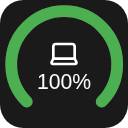
Battery Widget for Macro Deck 3 This widget shows your battery! (...if that wasn't obvious from the name)
Features
Opening the settings shows two tabs, Appearance and Devices. In Appearance you can change how it looks Circles! - Gauge mode - the thing where you can make it a half circle (180°) or slightly more full circle (270°) - Thickness of the circle - Rounded ends in gauge mode You can show or hide different settings like - Device name (also if it shows in the circle or under) - Percentage (also if it shows in the circle or under) And colors! - For different battery levels (for now only low/medium/high and their tresholds) - When a device reports chargin mode - Color of the icon - Color of the name - Color of the percentage In Devices you can change what it shows Devices are shown from Macro Deck 3's battery catalogue
Requirements Macro Deck 3.0.4 or newer 64-bit x86 Linux (linux-x64)
Install
Option 1. From the store (button above)
Option 2. From the releases Download the latest release from the releases Open Macro Deck 3 > Integrations > Add > Install from file... Select the downloaded file and press install!
License
MIT
商店目前不可用
无法加载商店,请稍后重试。