Macro Deck Store
Topluluk tarafından hazırlanan eklentiler ve simge paketleri. İhtiyacınız olanı bulun ve kurmak için Macro Deck’te açın.
Macro Deck'inizi genişletin
Deck'inize yeni eylemler, widget'lar ve görünümler getiren eklentileri ve simge paketlerini bulun.
Öğe bulunamadı
Farklı bir arama terimi veya tür filtresi deneyin.
Mağaza şu anda kullanılamıyor
Store yüklenemedi. Lütfen birazdan tekrar deneyin.
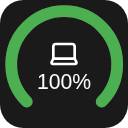
Battery Widget for Macro Deck 3 This widget shows your battery! (...if that wasn't obvious from the name)
Features
Opening the settings shows two tabs, Appearance and Devices. In Appearance you can change how it looks Circles! - Gauge mode - the thing where you can make it a half circle (180°) or slightly more full circle (270°) - Thickness of the circle - Rounded ends in gauge mode You can show or hide different settings like - Device name (also if it shows in the circle or under) - Percentage (also if it shows in the circle or under) And colors! - For different battery levels (for now only low/medium/high and their tresholds) - When a device reports chargin mode - Color of the icon - Color of the name - Color of the percentage In Devices you can change what it shows Devices are shown from Macro Deck 3's battery catalogue
Requirements Macro Deck 3.0.4 or newer 64-bit x86 Linux (linux-x64)
Install
Option 1. From the store (button above)
Option 2. From the releases Download the latest release from the releases Open Macro Deck 3 > Integrations > Add > Install from file... Select the downloaded file and press install!
License
MIT
Mağaza şu anda kullanılamıyor
Store yüklenemedi. Lütfen birazdan tekrar deneyin.