Macro Deck Store
커뮤니티가 만든 플러그인과 아이콘 팩. 필요한 것을 찾아 Macro Deck에서 열고 설치하세요.
Macro Deck을 확장하세요
덱에 새로운 액션, 위젯, 스타일을 더해 주는 플러그인과 아이콘 팩을 찾아보세요.
확장 기능을 찾을 수 없습니다
다른 검색어나 종류 필터를 시도하세요.
스토어를 지금 사용할 수 없습니다
스토어를 불러올 수 없습니다. 잠시 후 다시 시도해 주세요.
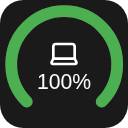
Battery Widget for Macro Deck 3 This widget shows your battery! (...if that wasn't obvious from the name)
Features
Opening the settings shows two tabs, Appearance and Devices. In Appearance you can change how it looks Circles! - Gauge mode - the thing where you can make it a half circle (180°) or slightly more full circle (270°) - Thickness of the circle - Rounded ends in gauge mode You can show or hide different settings like - Device name (also if it shows in the circle or under) - Percentage (also if it shows in the circle or under) And colors! - For different battery levels (for now only low/medium/high and their tresholds) - When a device reports chargin mode - Color of the icon - Color of the name - Color of the percentage In Devices you can change what it shows Devices are shown from Macro Deck 3's battery catalogue
Requirements Macro Deck 3.0.4 or newer 64-bit x86 Linux (linux-x64)
Install
Option 1. From the store (button above)
Option 2. From the releases Download the latest release from the releases Open Macro Deck 3 > Integrations > Add > Install from file... Select the downloaded file and press install!
License
MIT
스토어를 지금 사용할 수 없습니다
스토어를 불러올 수 없습니다. 잠시 후 다시 시도해 주세요.