Macro Deck 3: A New Chapter
From a small proof of concept in 2018 to a completely rebuilt, cross-platform application. A look back at Macro Deck's history, the countless rewrites, lessons learned along the way, and why Macro Deck 3 marks the beginning of a new chapter for the project.
Contents
Almost eight years of development, countless rewrites, a lot of lessons learned, and finally a foundation that feels right.
Welcome to the first post on the official Macro Deck Blog! This is where you'll find development updates, technical insights, announcements, and occasionally some behind-the-scenes stories about Macro Deck. And since Macro Deck 3 is now only about two weeks away from its first stable release, I thought this would be a good opportunity to start with a little history of the project and explain how we actually got here.
How It All Started
The very first version of Macro Deck started somewhere around 2018 as a small proof of concept. At that time, software development was nothing more than a hobby for me, and I was basically learning everything as I went. Macro Deck was built using .NET Framework, was completely closed source, and had only a handful of integrations and features. It was also incredibly inflexible. There weren't even folders, so you can probably imagine how limited everything was compared to what Macro Deck can do today.
For some reason, people actually started using it. More and more users discovered Macro Deck, and at some point I even started seeing tutorials about it on YouTube, which was pretty crazy to me back then. So I kept working on it, adding features, fixing bugs, and trying to improve things wherever I could. The problem was that I didn't really know much about software architecture at the time. Most of the code was written through trial and error, and while that worked surprisingly well for a while, it eventually became a huge problem.
At some point, I had basically coded myself into a corner. Adding new features became increasingly difficult because everything was so tightly coupled, and changing one thing could easily break something completely unrelated. Looking back at that code today, it's honestly pretty terrible, but that's also just what happens when you build something while learning how to write software in the first place.
Macro Deck 2: Starting Over
In 2021, I started developing Macro Deck 2. The idea was simple: take everything I had learned from the first version and build something better. And in many ways, that actually worked. Macro Deck 2 introduced a lot more features, was much more flexible, and eventually became open source, which was a pretty big step for the project.
Unfortunately, I also made some architectural decisions that I would later regret. While Macro Deck 2 was now using .NET Core instead of the old .NET Framework, I decided to stick with Windows Forms for the user interface. That meant Macro Deck was still limited to Windows, even though the underlying .NET runtime was no longer the problem.
The architecture itself wasn't particularly great either. At that time, I was still working full-time as an electrician, and software development was something I did in my free time. My code had definitely improved compared to the first version, but I still lacked a lot of the knowledge and experience needed to design an application that was actually maintainable, testable, and easy to extend.
To put it simply, Macro Deck 2 was still a lot of spaghetti code. Better spaghetti code than before, but spaghetti code nonetheless.
Of course, that didn't stop Macro Deck 2 from growing. More features were added, the plugin ecosystem developed, and the community continued to grow. But behind the scenes, I was becoming increasingly unhappy with the technical foundation.
The Never-Ending Rewrite
Around 2022, I started thinking about rewriting Macro Deck yet again, mainly because I wanted to finally get rid of the Windows-only limitation. I experimented with cross-platform UI frameworks like Avalonia and Uno Platform, but none of the results really convinced me. There were always things I wasn't happy with, whether it was the UI, the architecture, or simply how everything worked together.
Then, in January 2023, something changed quite significantly for me personally. I started working professionally as a software developer after switching careers from being an electrician. Suddenly, I was working with software every day, learning from other developers, getting more familiar with proper software architecture, and discovering approaches I hadn't even considered before.
My learning curve during that time was pretty steep, and it had a huge influence on Macro Deck 3.
The downside was that every time I learned something new, I started questioning decisions I had made just a few months earlier. So what followed was probably one of the most frustrating parts of Macro Deck's development history: rewrite after rewrite after rewrite.
I would start working on a new version, spend a few weeks completely locked in, make a lot of progress, and then eventually reach a point where I wasn't happy with the result anymore. Sometimes I would take a break for a few months, only to come back with another idea and start over again. Quite a lot of code ended up being thrown away during those years.
At some point, I moved away from the idea of building everything as one traditional desktop application and started experimenting with a client-server architecture. The backend would be based on ASP.NET, while Angular would handle the frontend. This already felt much closer to what I wanted, but even then, it took several more attempts before everything finally came together.
And that brings us to 2026.
Finally, Macro Deck 3
After all those attempts, I finally ended up with an architecture that I'm actually happy with.
Macro Deck 3 is built around an ASP.NET-based host with a frontend that partially uses Angular. The desktop application uses Tauri to bring everything together in a native window, while the client-server architecture allows Macro Deck to run on Windows, macOS, and Linux.
But the biggest difference compared to the previous versions isn't really the technology stack. It's how the entire application is structured.
Macro Deck 3 is designed to be modular from the ground up. Features are separated into integrations, the different components have clearly defined responsibilities, and the architecture makes it much easier to test, maintain, and extend the application without constantly having to work around decisions made years ago.
One of the things I'm particularly happy with is Macro Deck UI, the shared UI system that allows widgets and views to be rendered across different clients. Combined with the new plugin architecture, including support for out-of-process plugins, this opens up possibilities that simply wouldn't have been realistic with Macro Deck 2. Plugins can provide their own widgets and views using Macro Deck UI, without everything having to be built directly into the main application.
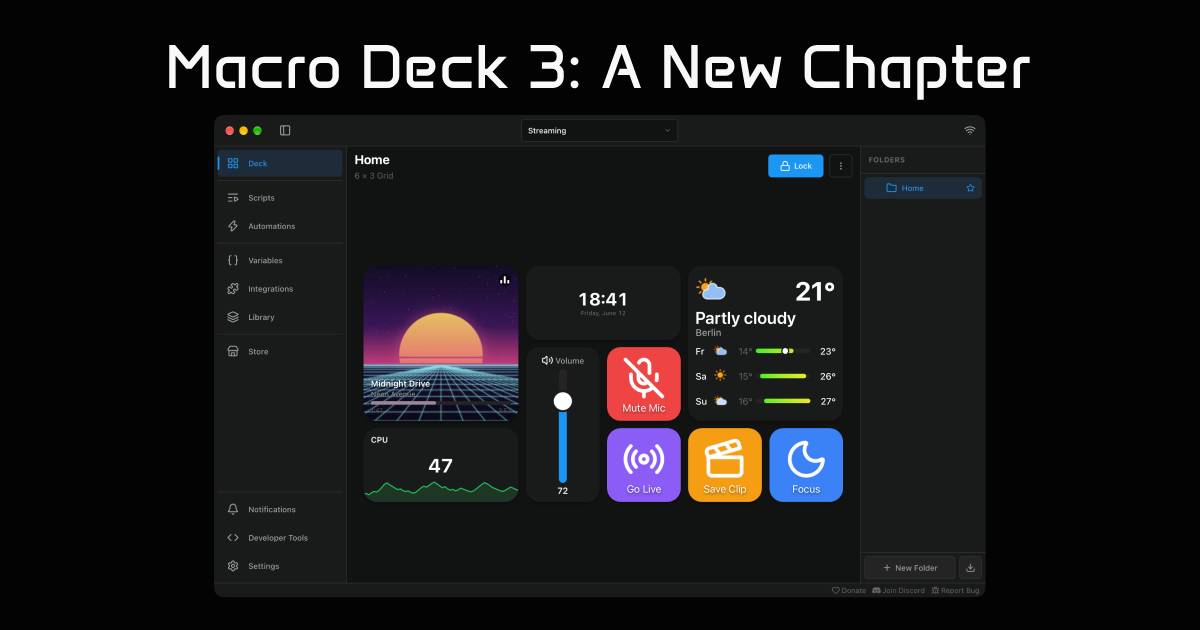
There's also the new Macro Deck Store, the Creator Portal, the native Companion Apps for Android and iOS, and a completely redesigned user experience. A lot has changed, and there are honestly too many things to cover in a single blog post.
Of course, Macro Deck 3 isn't perfect, and there will certainly be things that need to be improved or reconsidered over time. But for the first time, I feel like the underlying architecture is actually prepared for that. Components can be replaced, extended, or redesigned without having to throw away the entire application.
And that's probably the most important difference.
I don't want to rewrite Macro Deck ever again.
After spending years starting over, I'm pretty confident that Macro Deck 3 finally has the foundation it needs to keep evolving without another complete rewrite. That doesn't mean the architecture will never change, but those changes can now happen incrementally instead of requiring an entirely new application.
Macro Deck 3 is here to stay.
What's Next?
As I'm writing this, we're about two weeks away from the planned stable release of Macro Deck 3 on November 1, 2026. After all these years of development, abandoned prototypes, architectural changes, and countless hours spent working on this project, it's honestly a little strange to finally be this close.
The stable release obviously won't be the end of development. There are already plenty of ideas and features planned for the future, and I'm looking forward to finally being able to focus on building those instead of constantly rebuilding the foundation underneath them.
I also want to use this blog to share more about what's happening behind the scenes. Not every change or decision really belongs in a changelog or a Discord announcement, and there are quite a few technical topics I'd like to write about in more detail.
Before wrapping this up, I also want to say thank you to everyone who has been part of this journey. To everyone who tested the early closed beta builds, reported bugs, provided feedback, or helped improve things during the public beta: thank you. Your feedback has made a real difference, especially during these last months of development.
And of course, thank you to everyone who has used Macro Deck over the years, contributed to the project, developed plugins, helped other users, or simply recommended it to someone else. It's still pretty crazy to think that a small hobby project I started back in 2018 has turned into what Macro Deck is today.
I'm also looking forward to all the people who haven't discovered Macro Deck yet.
It's been a long road to get here, but I'm really excited about what's coming next.
Here's to Macro Deck 3, and hopefully many more years of Macro Deck!